Island & resources
Player portraits, sector ownership, armies, tech, named resources and icons, tower stocks, island totals, design costs and mining/research progress. Towers keep separate stockpiles; totals do not create a shared pool.
 SEMATOR
Lead your people through the epochs and conquer the islands.
Player portraits, sector ownership, armies, tech, named resources and icons, tower stocks, island totals, design costs and mining/research progress. Towers keep separate stockpiles; totals do not create a shared pool.
Presets and custom AI timing, starting men, reaction settings, personality comparison, copy/reset and autopilot. Enemy details are hidden until you choose to reveal them.
Independent music, effects and speech players, each with a volume and on/off switch. Event and speech logs help track the action. Use PAL ORIGINAL for normal timing and pitch.
Choose Off, Side Panel or Inside Bezel. The cabinet expands for the panel; if space is limited the combined view fits proportionally. Original French disks retain their French speech. Pompey uses its own English recordings and skips the original title sequence, so title-music and translation options are absent. Stereo title music is not stereo gameplay audio.
Mouse controls the pointer and on-screen commands. Left and right mouse buttons are available on the pad. Follow the game's prompts for text and disk requests.
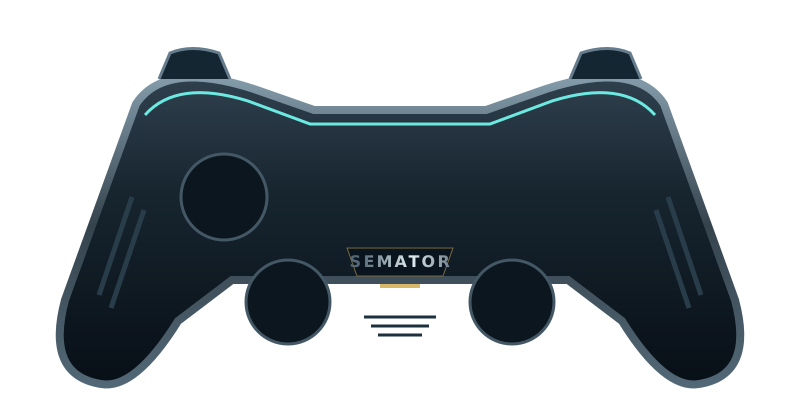
Select a button to see its action.
Original SemaTor controller illustration. Face buttons 1–4 correspond to south, east, west and north. A/B/X/Y in the table are SDL layout names; your pad’s printed labels may differ.
| Control | Action |
|---|---|
| Move mouse pointer | |
| Move mouse pointer | |
| Select / left click | |
| Right click | |
| Space key — game prompts | |
| Space key — game prompts | |
| Right click | |
| Select / left click | |
| Unassigned | |
| Unassigned | |
| Session menu (F11) | |
| SemaTor settings (F12) | |
| Unassigned axis / click | |
| Left stick click / Guide / extra buttons | Unassigned by default. Device or system Guide behaviour can vary. |
Mouse: move the pointer; left click selects; right click is available where the game uses it.
These are release defaults, not your saved remaps. Open F11 → Controls for this game for live mappings, or F12 → Controls to change them. Start and Back remain reserved for SemaTor menus. Mouse speed is adjustable. One active host gamepad is supported; two-player modes do not imply two simultaneous gamepads.
These are the exact identities used by the enhanced profiles in SemaTor 1.1.320. A recognised profile is not a promise that every level, option or graphics device has been tested.
Existing exact enhanced-profile identities. These editions are recognised by the release; no new complete-game test was performed in 1.1.320. Options marked TEST retain their individual limitations.
A full disk-image checksum has not yet been recorded for these editions. Use the exact program/boot identities below; the filename alone is insufficient.
| Edition / program | Identity | Bytes |
|---|---|---|
| Mega lo Mania (1991, Image Works, French) BOOT | boot-sector SHA-11da29bb726e6adb8e95915c3e88613fd3a6cd999 | 512 |
| Mega lo Mania (1991, Image Works, English, Pompey Pirates) MEGALOMA.PRG | raw program-text SHA-169f1a0e4ae2770c53a4a7ada6a130fe3a296cb4a | 72014 |
Program SHA-1 covers the raw executable text before relocation, excluding its file header. Boot SHA-1 covers the decoded 512-byte boot sector. Neither is the checksum of the whole PRG, STX or ZIP. SemaTor’s library problem-report draft includes the executable SHA-1 and whether it is exactly recognised.
Download the edition/checksum list. If your edition is different, report its identity before assuming its enhanced profile is compatible.
Names match the release profiles, including experimental and practice options. Availability depends on the recognised disk edition. A matching filename alone does not verify an edition; untested releases may behave differently.
Docked island overview and AI tuning panel. Original difficulty until changed; enemy statistics hidden by default.
Replay the original speech samples before YM DAC quantisation; effects volume controls speech. Keeps the original sample rate, loading and scheduling.
Share an expanded cabinet with the game; original game proportions are preserved
Read speech files directly from your mounted disk image; original playback and protection reads remain intact
Skip the story after its first picture; retain the title music and original game speed. Enable before starting or restarting.
Docked island overview and AI tuning panel. Original difficulty until changed; enemy statistics hidden by default.
Translate menus, epoch labels, disk prompts and most result text. Painted story/credit screens and dynamic titles stay French; short ranks use abbreviations.
Send the original four-channel title mix directly to the host PCM output, avoiding YM DAC quantisation. Original replay rate and timing; gameplay speech stays original.
Replay the original speech samples before YM DAC quantisation; effects volume controls speech. Keeps the original sample rate, loading and scheduling.
Share an expanded cabinet with the game; original game proportions are preserved
Separate the original four title voices into left/right channels; keeps original music sequencing and timing
Read speech files directly from your mounted disk image; original playback and protection reads remain intact
Android and dual-screen controls remain in testing. Touch layouts can differ from desktop gamepad defaults. Mega lo Mania’s Thor panel and direct-touch input need device validation; this guide does not certify every touch layout.