The title tunes. The boss themes. The music you stayed on the menu to hear. Bring your Atari ST, Mega Drive and Amiga collection together in one Jukebox.
These are the music catalogues included in desktop version 1.1.603. Add your own music files, disks or cartridges to hear them.
ATARI ST
A whole music archive.
YM + SNDH
File-based support · no fixed game total
Play supported music files, import a SNDH archive ZIP, or discover recognised music on your ST disks. One game can contain several tunes, and the archive also includes demos.
Your files define the collection
MEGA DRIVE / GENESIS
Your cartridges. Their music.
292
Listed game / cartridge names
The expanded catalogue recognises specific cartridge editions and plays their music through SemaDrive's own YM2612 and PSG emulation.
4,584 track entries across supported editions
AMIGA · EXPERIMENTAL
Paula takes the stage.
727
Listed game names
Game music found on supported disks: extracted modules and the games' own music players, running through SemaBench. You can also add compatible four-channel modules.
1,166 catalogue cues + dedicated disk imports
What the numbers mean. Game names are counted as listed in version 1.1.603, with repeated identical names grouped. Regional titles, compilations and variants can still have different names, so these are not counts of unique underlying games or complete soundtracks. Support depends on the edition you supply. The ST discovers music files rather than using a fixed game catalogue.
See how the counts are worked out
Mega Drive: 19 established soundtrack profiles plus 275 generated cartridge entries. The generated entries have 273 different names, giving 292 listed names overall. Across all 294 profiles there are 4,584 non-retired track entries; those include different editions and are not 4,584 unique songs.
Amiga: 833 disk catalogue entries have 724 different game names. Dedicated importers for Turrican II, Fire & Ice and Shadow of the Beast bring the listed-name count to 727. The generated catalogue contains 1,166 cues: 335 extracted modules and 831 cues played by the games' own music routines. Dedicated disk imports and additional module files are outside that track count.
Generated entries may use numbered track names, and not every entry has been individually auditioned. Some imports can fail, particularly with the experimental Amiga core. The figures describe the shipped catalogue, not music bundled with SemaTor.
ONE PLAYER, EVERY HOME
Keep the good bits on repeat.
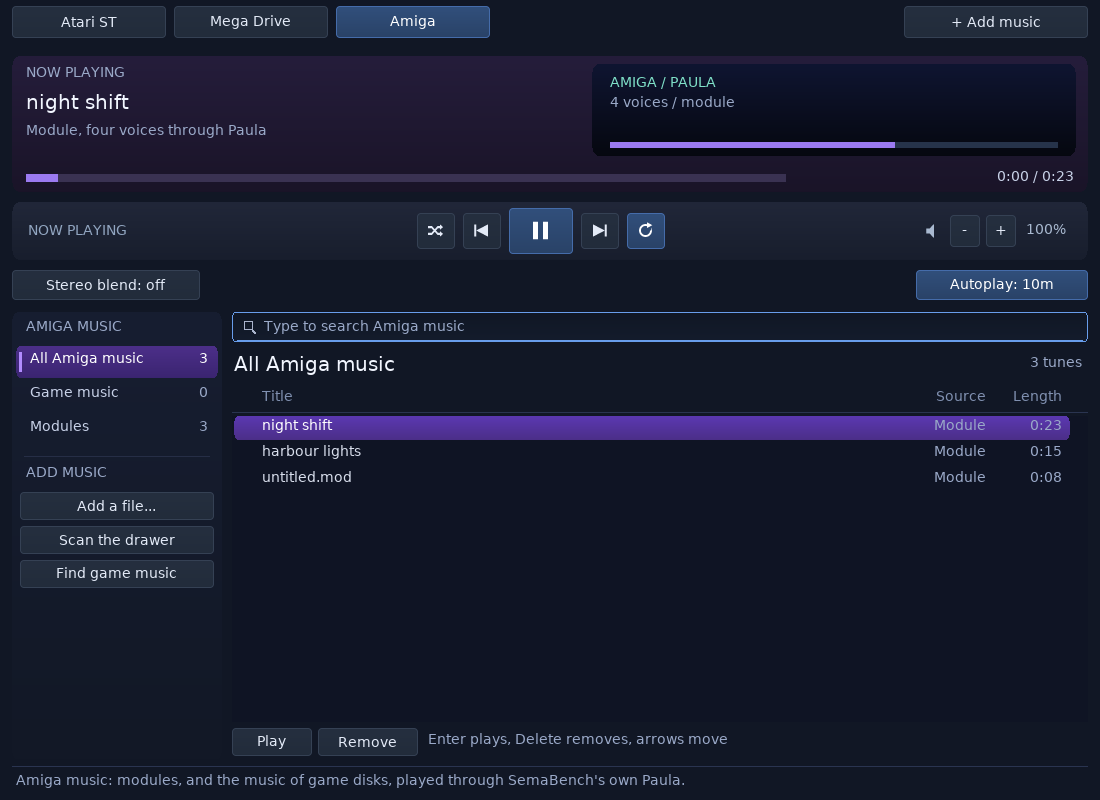
Switch between Atari ST, Mega Drive and Amiga from the same player. Browse music, search for a favourite, shuffle, repeat and follow the visualiser. Open it from any system's desktop and return to that desktop when you're done.
The real SemaTor Jukebox, showing the Amiga tab with example modules. The three tunes in this screenshot are an example library, not the catalogue limit.
BUILD YOUR LISTENING ROOM
Bring your music. Press play.
01 / ATARI ST
Add files or an archive.
Open the Jukebox's Atari ST tab. Use Get SNDH for the guided archive import, or add supported YM/SNDH files. Inserted ST disks are checked for recognised music; Scan A and Scan B repeat the check.
02 / MEGA DRIVE
Choose a cartridge.
Open the Mega Drive tab and choose Browse file… to import your cartridge. Use Supported games in the player to check its catalogue. Matching editions become albums in your collection.
03 / AMIGA
Find music on your disks.
Add your Amiga game disks to the library, then choose Find game music in the Amiga tab. You can also use Add a file… for a compatible module, or Scan the drawer for your music folder.
No. They describe Jukebox music support. A soundtrack can work when the full game does not, and a playable game may have no Jukebox importer. The enhanced-games directory describes gameplay features separately.
Why doesn't my edition import?
The cartridge and disk catalogues recognise specific editions. A different release may need a different music player or disk layout. ST disk scanning finds supported music formats; it cannot extract every custom game driver. An empty result does not mean the disk has no music.
Is the music bundled?
No. The catalogues contain the information needed to find and play music from media you provide. Add your own supported files, disks or cartridges.
Does music support cover every song in each game?
Not necessarily. A catalogue entry may contain a title tune, selected tracks or modules found during a game scan. Some entries are numbered rather than named. Amiga coverage is experimental and some imports can fail.
 SEMATOR